N’TO – Clé des Champs

I used my strategy to code some of Clé des Champs.

This is the track

Code:

use_bpm 113
chords = [(chord :Bb, :minor), (chord :F, :major)].ring
c = chords[0] # take the first chord of the ring and save it to a variable
s=1
live_loop :ambiant do
sync :rhythm
use_octave -2
use_synth :dtri
play_pattern c, sustain: 2,amp: 0.5
sleep 4*s
end
live_loop :chord_chooser do
sync :rhythm
8.times do
c = chords.tick
chords = [(chord :Bb, :minor), (chord :F, :major)].ring sleep 4*s
end
4.times do
chords= [ (chord :Eb, :minor), (chord :Db, :major), (chord :Ab, :major), (chord :F, :major)].ring c = chords.tick sleep 4*s
end
end
sleep 4s live_loop :rhythm do sleep 0.5 sample :drum_cymbal_closed sleep 0.5 cue :rhythm end sleep 32s
live_loop :melody do
use_synth :dsaw
play c.choose,attack: 0.1,sustain: 2, sustain_level: 1, release: 1, cutoff: rrand(60, 120),amp: 0.5
sleep s
play c.choose,attack: 0.25,sustain: 2, sustain_level: 1, release: 1, cutoff: rrand(60, 120),amp: 0.5
sleep s
play c.choose,amp: 0.5
sleep s
play c.choose,attack: 0.1,sustain: 2, sustain_level: 1, release: 1, cutoff: rrand(60, 120),amp: 0.5
sleep s
end
sleep 16*s
live_loop :drums do
sync :rhythm
sample :bd_tek
sleep 0.5
sample :drum_cymbal_closed
sleep 0.5
end
Sonic Pi strategy

Between yesterday and today, I have been experimenting with Sonic Pi to make a nice strategy for the pieces.

My initial plan is to emulate a band and it components.

Rhythm

Just like any band has a mutual timekeeper. I included a virtual one.

This module throws in a cue every beat that different components of the song follow .

cue :rhythm 

Chord chooser

This guy doesn’t actually make any sound. Basically it tells everyone what set of notes they can play at any given moment. He is useful alongside the rhythm so that the music sounds in sync.

Melody and chords

These are written in separate modules so they can be played at the same time and debugged easily.

They play notes from the notes specified by the chord chooser.

Getting hands-on experience with Sonic Pi

Creative programming workshop with Sonic Pi

I found a hands-on tutorial for Sonic pi.

Here is how it goes. We already covered some of t he poonts by sequentially going through the documentation.

Looping

We can loop infinitely by:

loop do
sleep 0.5
play :d4
sleep 0.5
play :e4
sleep 0.5
play :c4
sleep 0.5
end 

Or we can specify the number of repitions

4.times do
sleep 0.5
play :d4
sleep 0.5
play :e4
sleep 0.5
play :c4
sleep 0.5
end

Adding different tracks

Here a live_loop comes into play. basically multiple sounds play at the same time.

use_bpm 100
live_loop :drums do
sample :drum_heavy_kick
sleep 1
sample :drum_snare_hard
sleep 1
sample :drum_heavy_kick
sleep 1
sample :drum_snare_hard
sleep 1
end
live_loop :hihat do
sample :drum_cymbal_closed
sleep 0.25
sample :drum_cymbal_pedal
sleep 1
end
live_loop :bass do
use_synth :fm
play :c2, attack: 0, release: 0.25
sleep 0.25
play :c2, attack: 0, release: 0.3
sleep 2
play :e2
sleep 0.75
play :f2
sleep 1
end

Now that we have the bass and drums, let’s start to worry about the main melody.

Lead track

Instead of typing play, sleep for every single note, we can use the play_pattern_timed method.

live_loop :melody do
play_pattern_timed [:c4, :e4, :f4, :g4, :f4, :e4, :f4, :g4, :f4, :e4, :f4], [0.25, 0.25, 0.25, 1.5, 0.25, 0.25, 0.25, 0.25, 0.25, 0.25]
end
play_pattern_timed [notes],[lengths]

(pseudo-)Randomness

We can play random notes, lengths and anything that can be controlled by numbers really.

  • to choose randomly from a list of notes:
play [40,45,50].choose
  • To randomly choose an octave
use_octave [0, 1].choose
  • To randomly choose a note from a chord:
play (chord :c, :major).choose

You get the point.

We already covered ops, let’s look at effects;

Effects

we change the effects by encapsulating the code with with_fx

live_loop :effects do
with_fx :wobble do
with_fx :slicer do
with_fx :reverb do
play rrand(20,120)
sleep 0.5
sample :elec_plip
sleep 0.5
play rrand(20,120)
end
end
end
end 

This is what this piece of code sounds like:

Ticks and rings

Ticks go through the notes of a progression sequentially in a list. A finite list is bound to end. So we make it a circular list. A ring. Then we are ready to pass it.

Variables

Variables are used to reference a certain object and do operations over it. In the context [of music, we can change the pitch played.

This is a useful tutorial plus it comes with a little cheat sheet:

https://sonic-pi.mehackit.org/exercises/en/10-cheatsheet/01-cheatsheet.html

Samples in Sonic Pi

I got this from the official tutorial: https://sonic-pi.net/tutorial#section-3

Triggering Samples

This is straightforward, type

sample :ambi_lunar_land

Setting the amplitude and the pan

Just like the synths, we can control these parameters in samples

sample :ambi_lunar_land, amp:0.8, pan: -0.3

Stretching

samples can be squashed and stretched, even played backwards. Or better yet, squashed or stretched and played backwards.

sample :ambi_lunar_land, rate: 0.5

Explanation:

“Typically a waveform like this will have 44100 points of data per second (this is due to the Nyquist-Shannon sampling theorem). So, if the sample lasts for 2 seconds, the waveform will be represented by 88200 numbers which we would feed to the speaker at a rate of 44100 points per second. Of course, we could feed it at double rate which would be 88200 points per second. This would therefore take only 1 second to play back. We could also play it back at half rate which would be 22050 points per second taking 4 seconds to play back.”

Sonic Pi Official website

Envelopes

Here we should note the difference with synth ADSR envelopes. It lies in the sustain value.

“In the standard synth envelope, the sustain defaulted to 0 unless you set it manually. With samples, the sustain value defaults to an automagical value – the time left to play the rest of the sample.”

This is the reason why we hear the full length of the samples.

In short: attack times are used for fade ins and release times are used for fade outs.

envelopes can be used with samples to get nice effects on our samples.

More possibilities with the samples can be explored on the website

External samples

Sonic Pi can work with samples stored on the computer.’

for me, I can load a sample by typing

sample /Users/chadiabifadel/Downloads/Fun-Programming-master/processing/04/e100_rhythm/data/2.wav 

If you are interested in more information on samples in Sonic Pi, Go to https://sonic-pi.net/tutorial#section-3-1

Synths in Sonic Pi

This is taken from the official documentation of Sonic Pi: https://sonic-pi.net/tutorial#section-2

Playing around with synths is quite different with Sonic Pi.

Activating A note

Activating a note ca be as simple ,as typi ng

play 60

Changing the number controls the pitch.

Controlling amplitude and pan

amplitude is the computer’s representation of loudness. It’s a value between 0 and 1

Pan controls where the sound is coming from on stereo speakers. It’s a value between -1 and 1.

play 60, amp: 0.8, pan: -1  

Changing synth

“Notice that the use_synth command only affects the following calls to play. Think of it like a big switch – new calls to play will play whatever synth it’s currently pointing to. You can move the switch to a new synth with use_synth.”

use_synth :prophet
play 60

This changes the “instrument” of the notes played after it.

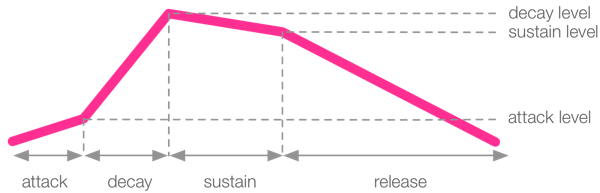
ADSR envelopes

ADSR envelopes represent how a sound’s wave looks like.

There are four phases of a sound: attack, decay, sustain and release

play 60, attack: 0.5, attack_level: 1, decay: 1, sustain_level: 0.4, sustain: 2, release: 0.5

they are best explained with this diagram:

ASR envelope
sonic-pi.net

Sonic Pi and Sam Aaron

First let’s look at this ted talk::

In this talk he raised a very nice question:

If you are not considering a career in professional writing, why do you even bother in learning how to read or write?

Sam Aaron

He eloquently linked this particular question to coding.

In The talk he showed how Sonic Pi works (please watch the talk)

Sonic Pi

This software has many upon many advantages. One of the advantages is being able to recreate music that has been notated classically. But this software doesn’t stop there:

  • It allows for Sampling.
  • it has different synths.
  • It allows us to perform

Yes. perform.

All of this fun stuff is backed up by nice physical and mathematical models.

All of this can be made with a keyboard.

The importance of my keyboard (now more than ever)

The accident I had three years ago marked me in most aspects of my life. My keyboard is no exception. Here’s how it fits in:

Before the car crash

I used it as a main way of conveying my ideas.

When I wanted to write a proposal. I used the keyboard.

When I wanted to do a University report. I used the keyboard.

When I needed to write code. I used the keyboard.

This list could go on, and on, and on… Bottom line is I used it to effectively and professionally do things.

I could type 120 wpm (words per minute)

Immediately after the car crash

I lost many faculties and bound on a wheelchair; I also lost my bilateral coordination.

I had to type with one hand.

This technology along with my determination helped me self publish a book. It had over 8500 words. (With a 13 wpm speed)

a year later, I coded a “dancing” environment

Starting 2020

Now I can pull off a nice 30 wpm. I am working in good data science projects spanning from costumer insight to text data processing and anything in between.

And what does it have to do with an instrument?

Good point.

I want to look at the possibilities of a keyboard in sound in general.

We can take the physical instance of a keyboard or explore what it can do with a computer.

Project 2: Instrument / Instrumental

This is a post to reflect on the statement of the project.

This project will begin by expanding and interrogating the idea of an instrument

Project 2 definition

Here an in instrument is understood in its broadest sense and it includes:

  • Hardware
  • Software
  • Instrument Building
  • Hardware Hacking
  • Software Hacking
  • Sound sculpture
  • improvisation
  • loops
  • Performance
  • listening devices
  • mods 

This list isn’t all-inclusive. So we have the liberty to explore any kind of way that can make a sound or a noise that has meaning.

Project 1 – Schizophonia

Now that I am done working on the project , here is a Summary Post

Development

Project definition

You are to consider the possible relationships between the aural phenomena associated with all things in particular contexts that you devise.

CAEL2041 project 1. ‘Schizophonia’

I talk about this more in this post.

Project statement

My concept is to relay absurdism through a split between “reality” of the world around me and my Reality. I chose multiple  recordings of Bach’s Cello Suite. As soothing music plays, I show different footage of the events that happened in the past three years; through appropriation and recontextualisation. I am not stating that I had anything to do with Bach’s piece. Philip Brophy is one of the artists that worked in this. I also used concepts that resonate with Dadaism.

The process used is GarageBand and iMovie. I took the liberty of taking a MIDI record and restructuring them to make a rather 2020 feel to it.

For my final step, I took my project online, assessing the comments given. (Youutube, Facebook , WhatsApp and Instagram)  

Dadaism and absurdity

Another artist that inspired me in the way he relates absurdity is Marcel Duchamp.

I posted about Dadaism here.

Implementation

Music

Choice of music

I needed to choose one piece with different recordings. Bach Cello suite.

In This post, I laid down the factors that made me choose it:

  • Be soothing to me
  • Be famous enough to have online support from the open source community
  • Have a wealth of usable musical information

Further edits and repetitiveness effect

I Edited a different MIDI recording in Garage band. I took the first 4 bars and looped them over and over again. This would amplify the effect I am looking for. This is a post going over this process.

This is my first tinkering with the Midi file

With further adjustments that were shown here, I came to my final audio.

these adjustments had three main conditions:

  • Make it Periodic for absurdism
  • Let go up and down and alternate between sounds
  • Maybe add a drummer?

This left me with the final version of the audio.

Movie

Script

I’m done with the music at that point. I need to start on the movie. I jotted down a broad script:

Getting footage

I’d categorised my footage into buckets that divide the footage into years. I neatly organised them into folders to make the work easier.

Putting things together

In iMovie, I reorganised the footage. made it work with the audio.

I also made one longer version for Youtube and another, shorter one for Instagram.

Here I write about this

Audience

So far, we have looked at the “particular contexts that you devise”.

Let’s see where I goes with contexts I don’t devise.

In the telecom industry a message has three components :

  • The sender: this is the person or device that is sending the message
  • The medium: this is the means for transmitting the message. This is where the most technical part. i.e. cables for a landline phones, sound and air for musicians, Video for movie makers…
  • The receiver: This is the person that receives the message

Basically I am looking at how my message goes through with different mediums.

First go

I had a quick run on Instagram. Without thinking a lot about the message.

Here is a post about it

I also sent it to some friends casually on WhatsApp

Here is a post about it

A better message

Now that I have a first impression of what the comments look like, I want to see if I can have some sort of “control” over the perception given that I have little control over the context.

First I worked on a message to send.

Here is a post about it.

And sent it to 97 contacts.

These are some of their responses

Comments

So I waited a day to get the responses. That way I sort them and look for patterns.

The Comments were on Manny fronts, let’s check them out.

Looking at this set of comments, I was able to see some kind of split between what I originally meant and what people understood.

General

I got my share of general comments.

For example:

  • you made my day 😅
  • 🔥 🔥
  • Bravo👍💃
  • Love thiss
  • ❤❤
  • Beautiful❤
  • Beastt Chadyyy !!👑
  • Niceee😍
  • 😍😍😍

Conveying feelings

A lot of comments focused on me being in the video and the feelings associated

  • Love how far you’ve come champ ❤😘
  • Loveee ittttt ❤🥰🥰 And miss youu
  • To see your videos and I saw omg how cuteee you made it
  • Blood you are a legend. “Dammete ente oustoura”
  • You did a great job so far and you never put your hands down. See? Keep going there is more to come despite all the odds. I like the video #realfacts
  • Yes we live in a crazy times but NOT everyone can adapt to the changes of times except the strong minded people and u r #1 example to that 💣🔥🙏❤️💋

The effect conveyed

One comment exactly told me what effect I conveyed

“This seems so high tech”

Thought provoking

I got a good chunk of thought provoking comments like. The sociological aspect of my piece was highlighted:

  • I love this
    The portrayal of the absurdity of the current circumstances and both personal and communal struggle and resilience is intense

Another comment summed up the intensity of the events and the complexity of having to endure multiple ones:

  • There’s a proverb that says “ when it rains it pours”. In this video you depicted just that but on a 3 year period, which is absurd. Most people break down when being that overwhelmed, but on the contrary you showed mental strength and resilience. Overall, great video. Better days are waiting for you and for humanity in general, until then we have to stand together and support each other!

Design a site like this with WordPress.com
Get started