This is taken from the official documentation of Sonic Pi: https://sonic-pi.net/tutorial#section-2
Playing around with synths is quite different with Sonic Pi.
Activating A note
Activating a note ca be as simple ,as typi ng
play 60
Changing the number controls the pitch.
Controlling amplitude and pan
amplitude is the computer’s representation of loudness. It’s a value between 0 and 1
Pan controls where the sound is coming from on stereo speakers. It’s a value between -1 and 1.
play 60, amp: 0.8, pan: -1
Changing synth
“Notice that the use_synth command only affects the following calls to play. Think of it like a big switch – new calls to play will play whatever synth it’s currently pointing to. You can move the switch to a new synth with use_synth.”
use_synth :prophet
play 60
This changes the “instrument” of the notes played after it.
ADSR envelopes
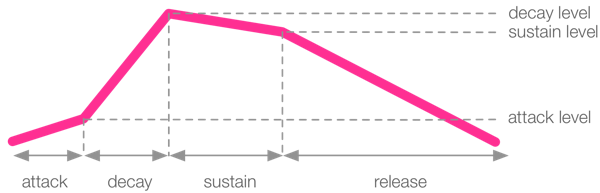
ADSR envelopes represent how a sound’s wave looks like.
There are four phases of a sound: attack, decay, sustain and release
play 60, attack: 0.5, attack_level: 1, decay: 1, sustain_level: 0.4, sustain: 2, release: 0.5
they are best explained with this diagram:
 CAEL2041: The Art of Sound and Noise